Bonjourno everyone!
this is my first coding project in fusion, and I’ve made a number guessing game with the help of google Gemini!
Here is the link to the project if you do want to try it out yourself
Here is the link to the transcript between me and Google Gemini
Here is the line by line code explanation
import random
This line imports Python’s built-in random module, which allows the program to generate random numbers. We need it to pick a secret number for the guessing game.
def check_guess(guess, secret_number):
Defines a function called check_guess that takes the player’s guess and the secret number as inputs.
if guess < secret_number:
print(“Too low! Try again.”)
Prints a hint if the player’s guess is smaller than the secret number.
elif guess > secret_number:
print(“Too high! Try again.”)
Prints a hint if the player’s guess is larger than the secret number.
while guess != secret_number:
while True:
player_input = input(“Enter your guess: “)
try:
guess = int(player_input)
break
except ValueError:
print(“That’s not a valid number. Please enter an integer.”)
secret_number = random.randint(1, 100)
Chooses a random number between 1 and 100 for the player to guess.
guess = 0
Initializes the guess variable so the loop can start
print(“I’m thinking of a number between 1 and 100.”)
print(“Can you guess what it is?”)
Prints instructions to the player about the game.
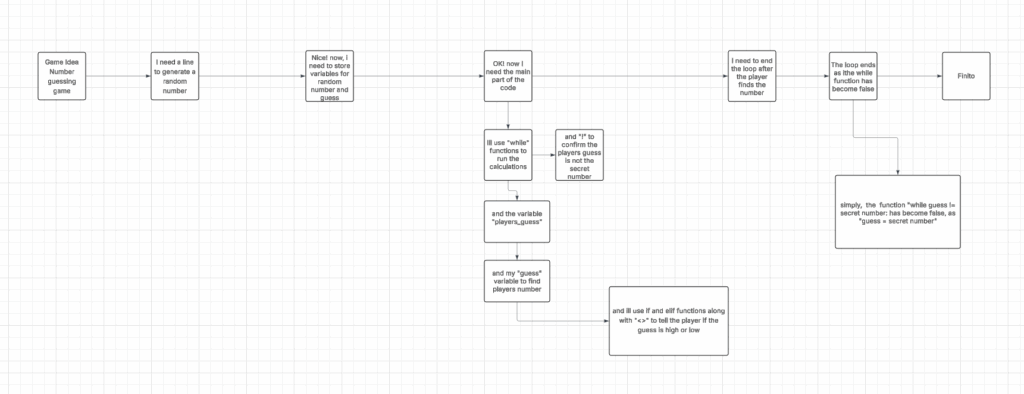
while guess != secret_number:
Repeats the loop until the player guesses the correct number.
player_input = input(“Enter your guess: “)
Asks the player to type in a guess.
guess = int(player_input)
This Converts the players input from text to a number.
check_guess(guess, secret_number)
Calls the function to check the guess and give feedback.
print(f”🎉 You got it! The secret number was {secret_number}.”)
After the loop ends (player guessed correctly), prints a congratulatory message. The f in front of the message is like saying, ‘Hey, put the real number here!’ so instead of showing {secret_number}, it shows the actual number you were thinking of.
The function is called from
def check_guess(guess, secret_number):
to
check_guess(guesss, secret_number)
Thanks for reading!


Leave a Reply to princetonc Cancel reply