A native iOS cognitive prosthetic that predicts ADHD executive-function crashes and steps in before you stall.
Introduction
The last thing I built was a planner. It worked, but there was a lot more I wanted to solve.
I have ADHD, and the failure I kept hitting wasn’t forgetting that an assignment existed. Canvas told me. My calendar told me. The planner I built told me twice. I knew exactly what was due and when. I still couldn’t start. That gap, between knowing what to do and being able to begin, is the thing every productivity app I’ve ever used quietly assumes away.
So I threw the planner out and built Vigil instead. Vigil is a native iOS app that reads passive signals like sleep, heart-rate variability, and upcoming deadlines, compares them to your own baseline, and predicts when your executive function is about to crash. When it sees the moment coming, it steps in where you already are, through a notification, the Dynamic Island, or a home-screen widget, and hands you one tiny first step inside a 15-minute focus sprint. Calling it a task manager misses the point, and so does calling it a screen blocker. It works on the one moment those tools skip right over, the gap between knowing a task is due and being able to begin it.
This is the full report on what I built, how it works under the hood, how I tested it, and what I’d do next. Fair warning before you start: this turned into a big one. The short version is that Vigil is a working prototype with a complete end-to-end loop, 110 Swift files, 138 tests, and zero third-party runtime dependencies, and the most important decision in the whole project was deleting a working app.
Project Goals
THE PROBLEM: Students with ADHD don’t mostly fail at remembering tasks. They fail at starting them, on the specific days when sleep, stress, and avoidance stack up into a stall they can’t see coming. Psychologists call this an executive-function deficit, and task initiation is one of its core components (Barkley, 2012). The lived version is simpler: “I know it’s due. I can’t make myself begin.”
DEFINITION STATEMENT: Build a system that detects the moment a student with ADHD is about to lose the ability to start, and that intervenes proactively, in the moment, with the smallest possible push, without becoming one more app they have to remember to open.
That last clause is the whole project. My previous app, LevelUp, was a genuinely good planner. It had Canvas sync, task breakdown, widgets, the works. But it had one fatal assumption baked in: that on a bad day, I’d open it. On the days executive dysfunction is worst, opening the app is exactly the thing you can’t do. The goal for Vigil was to move upstream of that assumption. Stop asking “what task is due?” and start asking “is this the moment they’re about to lose the ability to act?”
How I understood the user
The honest starting point is that the first user was me. I have ADHD, and Vigil began as a fix for my own worst days. That’s both an advantage and a trap. The advantage is built-in empathy. The trap is designing for a sample of one, so before I committed to anything I went and checked my own experience against the research.
The clinical literature lined up with the lived version in a way that changed what I built. Getting started on a task is treated as an executive-function problem, a failure of the self-regulation system that carries an intention into action over time, not a failure of wanting or knowing (Barkley, 2012). One study pulls the two apart cleanly: executive-function deficits and plain delay-aversion make statistically independent contributions to ADHD, and the executive side maps specifically onto inattention (Thorell, 2007). That is the whole reason Vigil targets the moment of starting rather than organizing a task list. A better list does nothing for a regulation deficit.
Each signal the engine reads has the same kind of grounding. Sleep carries the most weight because a meta-analysis of 70 studies covering 147 cognitive tests found that short-term sleep loss hits attention and vigilance harder than anything else it measured (Lim & Dinges, 2010), which is exactly the pattern of my worst days. HRV is in there because higher heart-rate variability tracks better executive and self-regulatory performance, both in the original neurovisceral-integration theory (Thayer et al., 2009) and in a more recent systematic review covering around 19,000 people (Forte et al., 2019), so it works as a cheap physiological read on how much regulation I have left that day. Screen time is a designed signal for an honest reason: heavy digital-media use predicts later ADHD symptoms in teenagers, though the effect is modest and the authors are careful to say it is not proven causal (Ra et al., 2018).
The intervention approach turned out to have a name in the research too. Delivering the right support at the moment of vulnerability by reading someone’s internal and contextual state is a just-in-time adaptive intervention, the framework built for exactly this problem in mobile health (Nahum-Shani et al., 2018). Finding that was reassuring. I had reverse-engineered a published design pattern out of my own frustration.
So the method was a loop: read the research, check it against my own bad days, then test it on people who weren’t me. My sister used the app as a real user and responded well to the flow, and a friend’s confusion is what drove the onboarding rewrite. The friction-profile step exists because of all of this. It asks the user to name their own stall signature instead of guessing for them, which is the one piece of primary research baked into the product itself. The honest limit is that this is secondary research plus my own experience plus a handful of testers, not a formal study with a user cohort. That cohort is the pilot, and it’s the next thing, not something I can claim yet.
Project Constraints
I had about six and a half weeks, working solo, and a pile of self-imposed rules that turned out to matter more than the deadline.
Who it’s for. The primary user is me, and students like me: people with ADHD whose main failure mode is task initiation, not organization. That’s a real constraint, not a throwaway line. It meant I optimized for the bad day, not the demo day.
Time. Roughly 6.5 weeks of real building (April 6 to May 22), single author, on top of school. That forced hard scoping. I’ll come back to what I deliberately didn’t build, because knowing what to cut was half the work.
Platform and privacy. iOS 18, Swift 6, SwiftUI, SwiftData. The data Vigil touches is health-adjacent and academic, which is sensitive, so I set two non-negotiable rules early: everything stays on-device, and there are zero third-party runtime dependencies. No analytics SDK, no crash reporter, no telemetry of any kind. The only two things that ever leave the phone are calls to the user’s own Canvas server and a single task title sent to Google’s Gemini API for first-step generation. That’s it.
Degrade gracefully. Not everyone has an Apple Watch, and not everyone connects Canvas. A missing signal can’t be allowed to crash the prediction. Every missing input had to resolve to a sensible default, never an error.
Project Expectations
Scope. A working, high-fidelity native prototype with the full loop wired end to end: live signal collection, a personal baseline, a prediction engine, a conservative intervention policy, the actual intervention surfaces (notification, Live Activity, widget), the focus sprint, and on-device logging built for future machine learning. Not a mockup. A thing that runs on a real iPhone and actually predicts and intervenes.
How I defined success. This is the part I had to get right before writing a line of code, because it changes everything downstream. Vigil does not measure itself by tasks completed. It measures itself by helping start: did it get the user moving at the right moment? I wrote down five principles early and kept checking features against them as I built:
- In-the-moment. It has to help on the exact day you can’t self-initiate. If it needs you to open it first, it’s failed before it started.
- Interpretable. You and I have to be able to see why it acted. A confident black box that’s wrong is worse than useless.
- Conservative. Silence is a feature. A tool that interrupts constantly gets muted, then deleted.
- Private. Health-adjacent data stays on the device. Non-negotiable.
- Measured by helped starts, not completions.
The third one, silence as a feature, is the one that’s easy to say and hard to live with. The whole product runs on trust, and false alarms are the fastest way to burn it. I’d rather Vigil miss a real stall than cry wolf, because the day it cries wolf is the day the user turns it off and I never get another shot.
Design Choices
Here’s the solution, what it looks like, and the design files behind it. Vigil is one app with three build targets: the main app, a widget extension that also hosts the Live Activity and its interactive buttons, and a test bundle. Under the hood it’s a sense-decide-act loop with a learning layer bolted on.
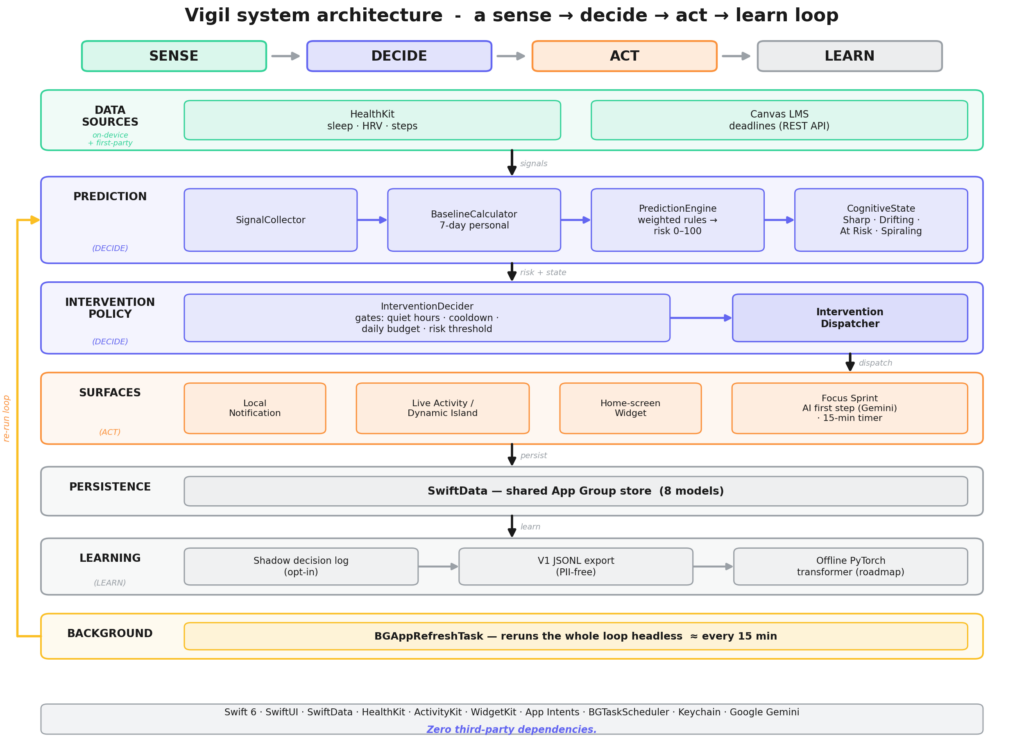
I’ll borrow the framing from control systems on purpose. Vigil isn’t a robot, but it’s structured like one: the signals are sensors, the prediction-plus-policy engine is the controller, and the notifications, Live Activity, and sprint are the actuators. Looking at it that way is what kept the architecture honest. Every layer has exactly one job.
The four cognitive states
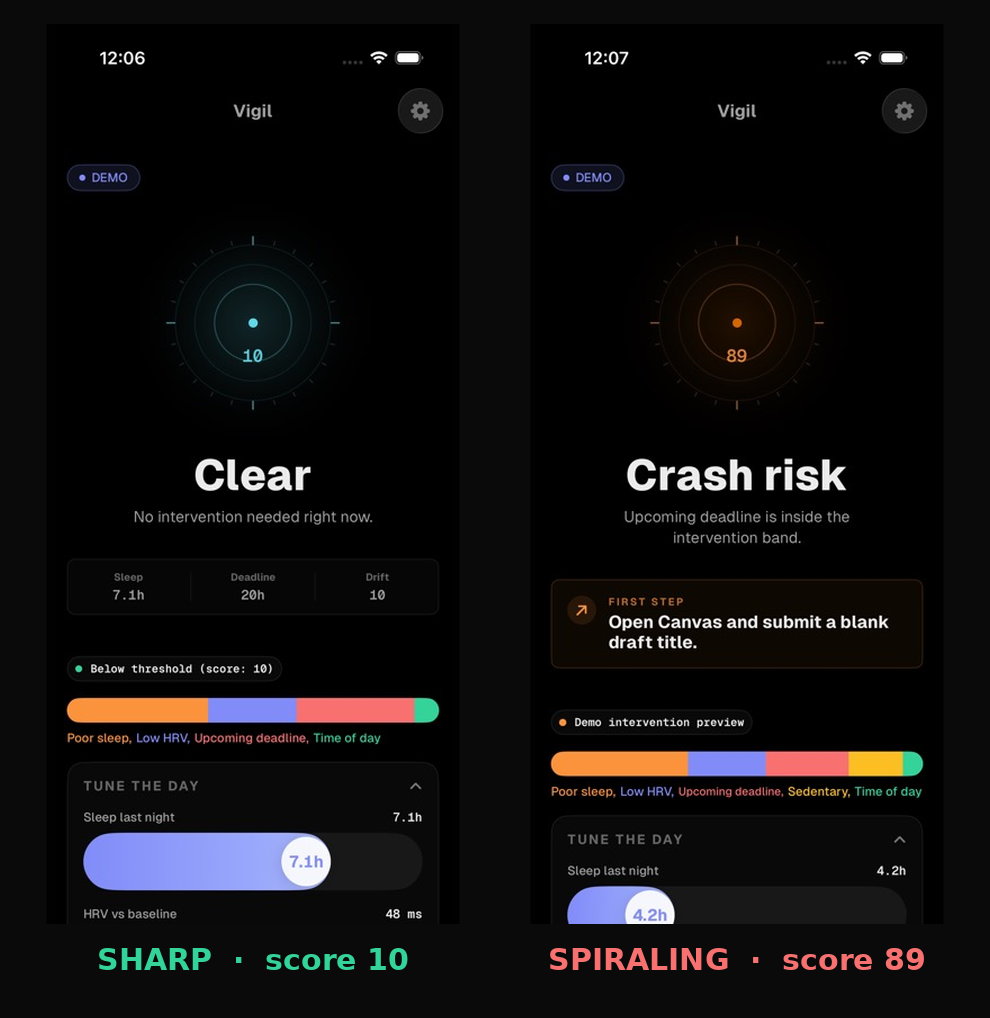
The engine produces a single number from 0 to 100, but a number isn’t something you feel. So the score collapses into four named states that drive every color, label, and decision in the app.
| State | Score | Color | What it means | What Vigil does |
|---|---|---|---|---|
| Sharp | 0–29 | green | Clear and capable | Stays silent. Good window for deep work. |
| Drifting | 30–59 | yellow | Early slipping | Watches. Surfaces an insight, no interruption. |
| At Risk | 60–79 | orange | Likely to stall soon | Fires a notification with a first step. |
| Spiraling | 80–100 | red | Crash imminent | Notification plus a Live Activity / Dynamic Island sprint. |
The dashboard
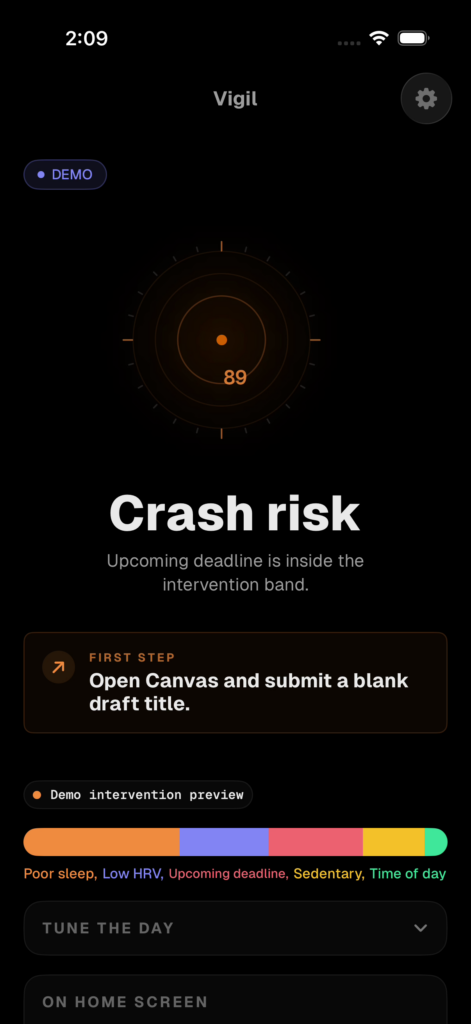
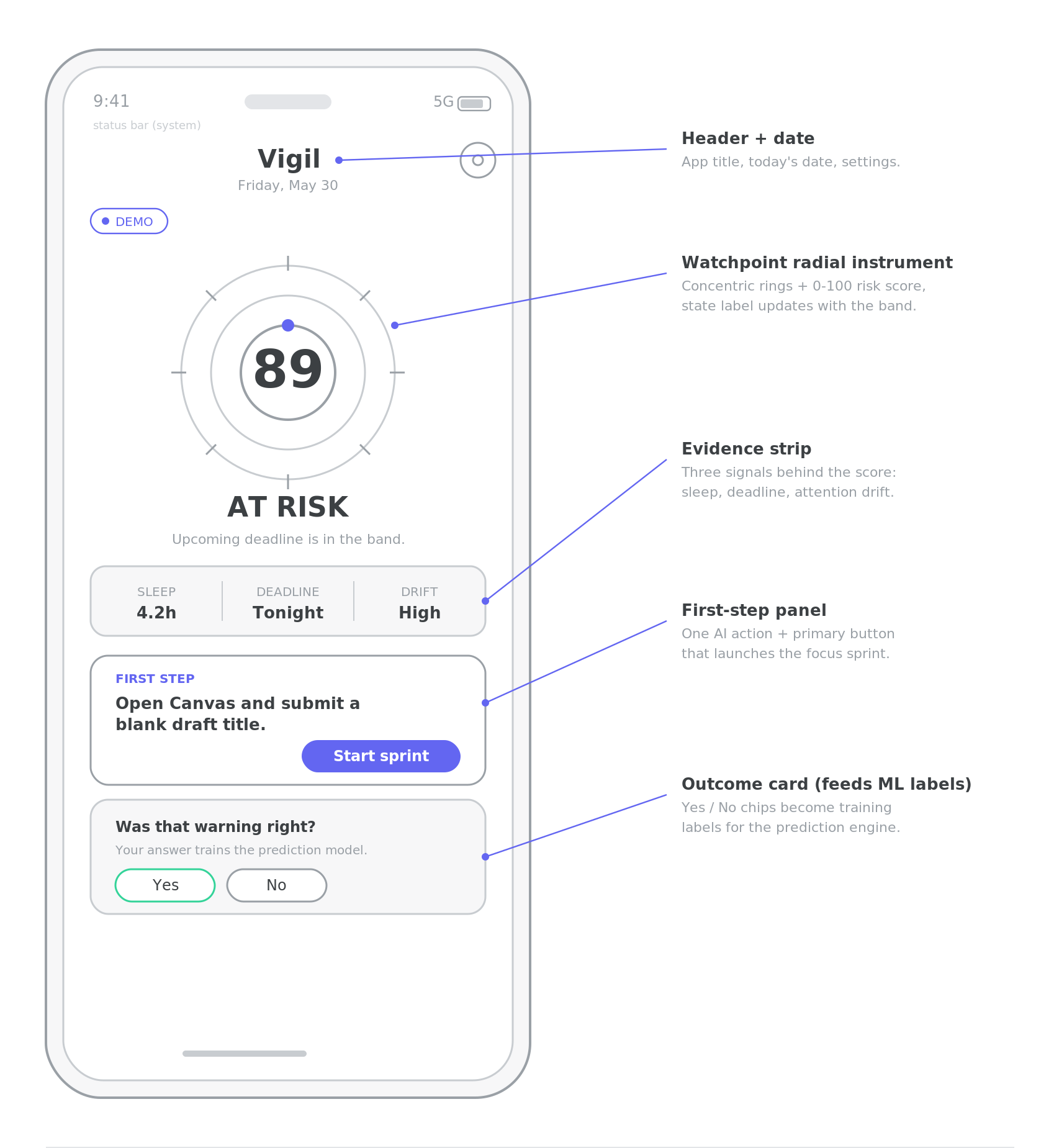
The home screen is built around one custom instrument I called the Watchpoint: concentric rings, 24 tick marks, a pulsing center dot, and the integer score in a monospaced typeface. I wanted it to feel less like a productivity app and more like a flight instrument. One number, one state, one action. Below it sits an evidence strip (sleep, nearest deadline, drift), a first-step panel, and an outcome card that asks “was that warning right?” and quietly feeds the answer into the training data.
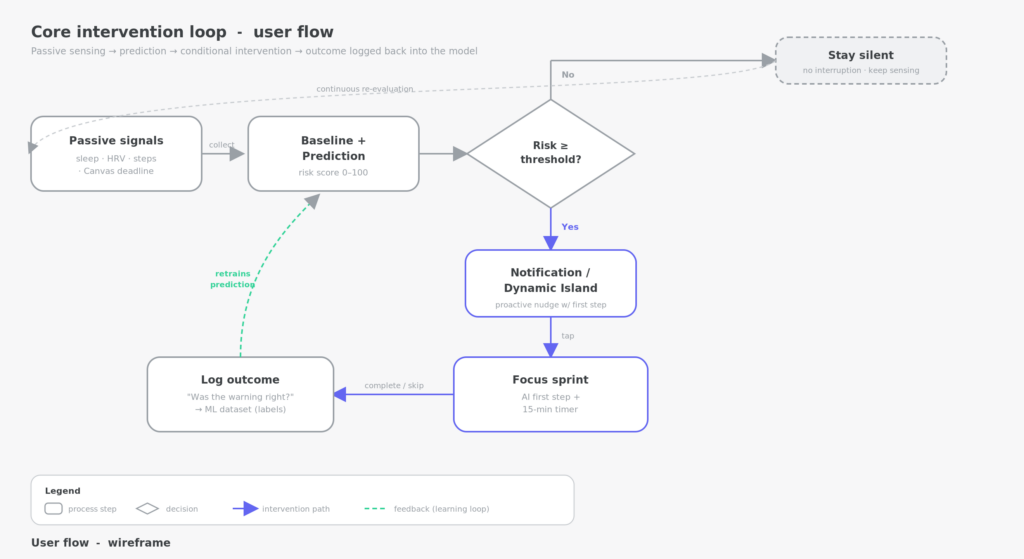
I didn’t design that screen in one shot. I sketched the structure as a low-fidelity wireframe first, decided the hierarchy, and only then built the real thing in SwiftUI.
From wireframe to shipped UI
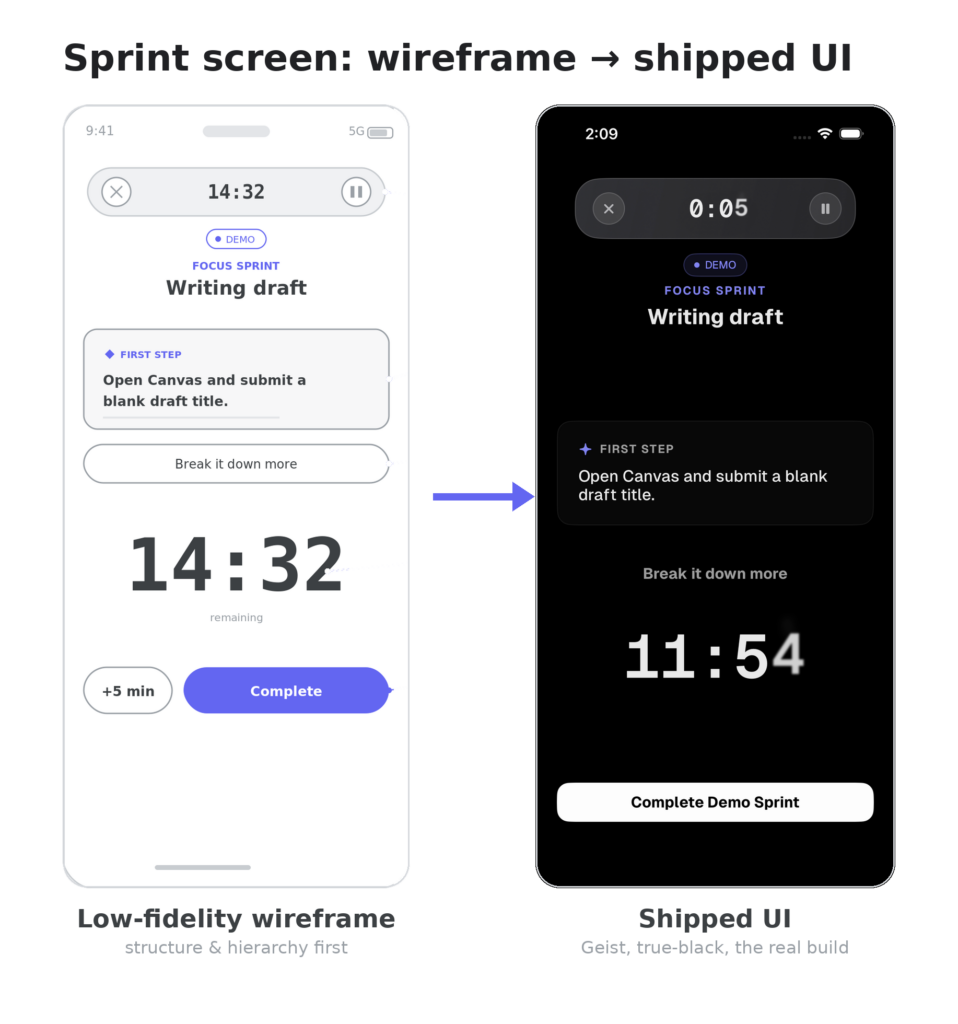
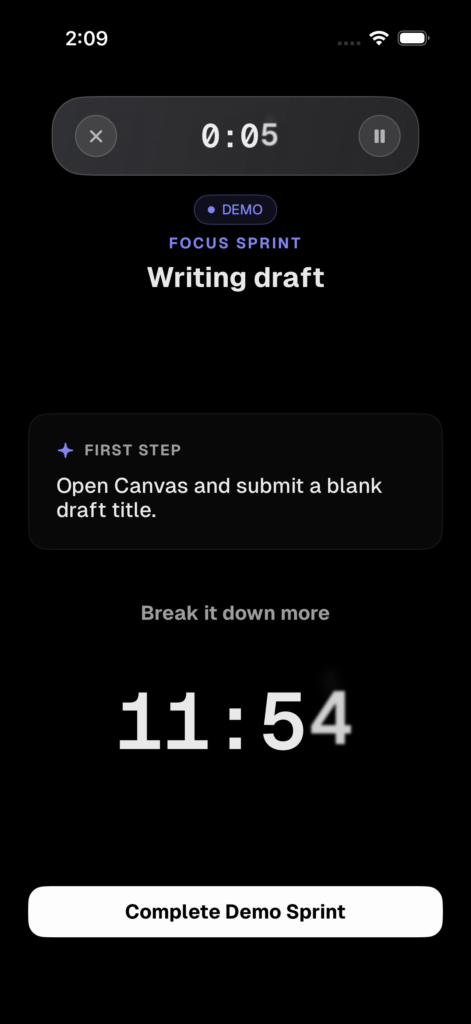
The sprint screen is the clearest example of how the design moved from low fidelity to the final build. The wireframe pins down what goes where. The shipped screen applies the real design language on top: the Geist typeface, true black, and a monospaced countdown.
The design system and brand
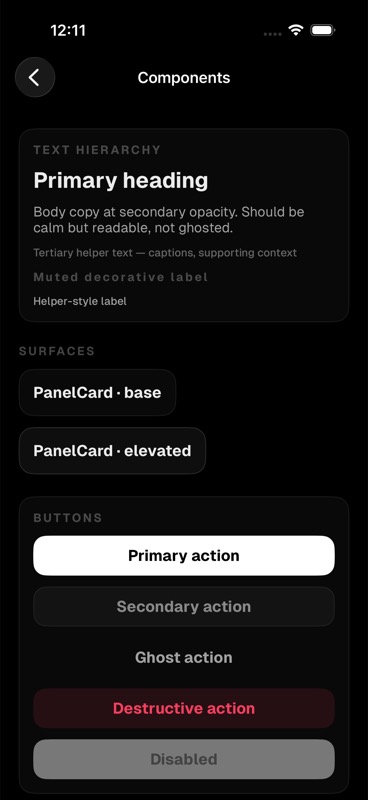
The visual language is a deliberate “clinical instrument” aesthetic. The signature move is a 12-step white-opacity scale on pure black, which is what makes the one bright number feel like a trustworthy readout instead of decoration. It’s Geist and Geist Mono throughout, dark-only, SF Symbols only, with named animation springs that all respect Reduce Motion.
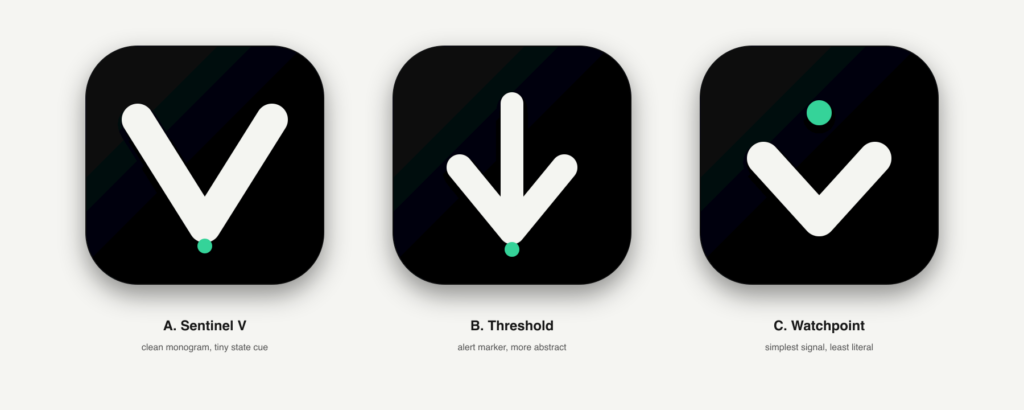
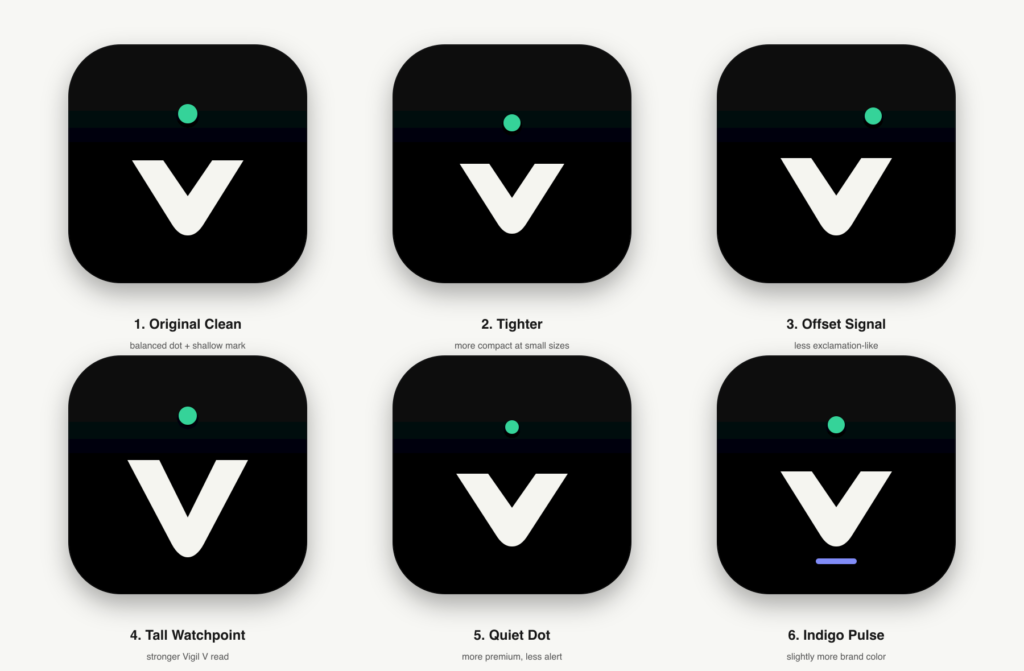
The brand went through real iteration, too. I explored three logo directions before committing, then refined the chosen “Watchpoint” mark across six variants before settling on the final icon.
Onboarding
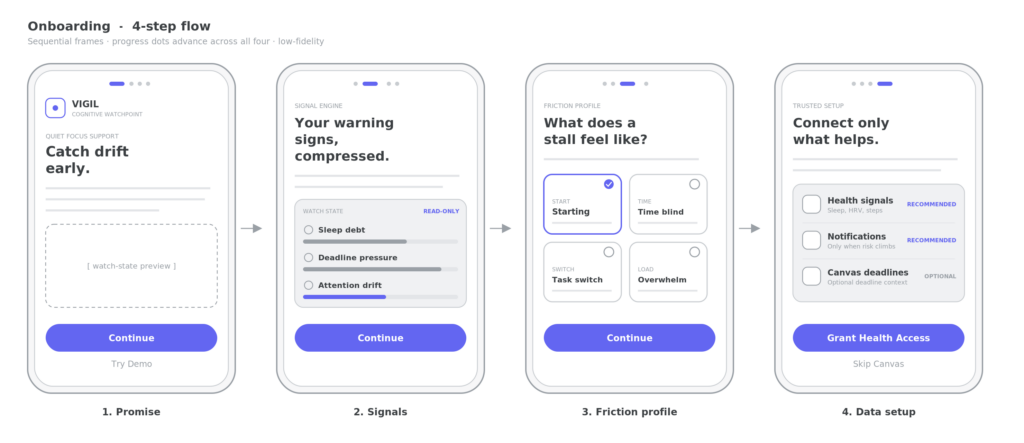
The first run is a four-step flow: a promise (“catch drift early”), an explanation of what Vigil watches, a friction profile where you tell it your specific ADHD failure signatures, and the real data setup (HealthKit permission, notification priming, optional Canvas connect). The friction-profile step matters more than it looks. It’s where the app asks the user to describe their own problem, which is both useful data and a small act of user research baked into the product.
Under the Hood: How Vigil Actually Works
This is the engineering core. If you don’t care about the code, skip to Project Planning. If you do, this is where the computational thinking lives.
The prediction engine
The engine is a deterministic, weighted-sum rules engine, and I chose that on purpose over a machine-learning model. It computes five per-signal sub-scores, each from 0 (fine) to 100 (bad), multiplies each by a fixed weight, and sums them. Sleep carries the most weight because, for me, it’s the signal that dominates everything else.
private let weights: [String: Double] = [
    "sleep":     0.35,
    "hrv":       0.25,
    "deadline":  0.20,
    "activity":  0.13,
    "timeOfDay": 0.07,
]

// --- Sleep (35%) ---  0 = great, 100 = terrible
let sleepScore: Double
if let hours = signals.sleepHours {
    if hours >= avgSleep { sleepScore = 0 }
    else if hours <= 4   { sleepScore = 100 }
    else { sleepScore = max(0, min(100, (avgSleep - hours) / (avgSleep - 4) * 100)) }
} else { sleepScore = 40 } // Unknown = moderate risk
A few things I want to point out, because they’re the whole reason it’s rules and not a model. First, look at the else branch on that last line: a missing sleep signal doesn’t crash, it resolves to 40, a moderate risk. Every signal has a default like that, so the app works on day one whether or not you own a watch. Second, the engine is “pure,” meaning the same inputs always produce the same output and it never touches the disk or the network. That makes it trivial to test with exact-value assertions, and it makes every prediction explainable. When Vigil says you’re at risk, it can tell you the dominant factor in plain English (“Poor sleep,” “Low HRV”), because it literally knows which weighted component was largest.
I did build the machine-learning version. There’s a PyTorch transformer sitting in the repo. I just refused to let it make decisions yet, and I’ll explain why in the design-decisions section.
The personal baseline
The reason the score is personal and not generic is the baseline. Five hours of sleep means something different for a six-hour sleeper than an eight-hour sleeper, so the engine normalizes every signal against your own 7-day rolling average.
// Last 7 days of snapshots (need >= 3 to be meaningful)
let sevenDaysAgo = Calendar.current.date(byAdding: .day, value: -7, to: Date()) ?? Date()
guard let snapshots = try? modelContext.fetch(snapshotDescriptor), snapshots.count >= 3 else {
    return nil  // fall back to population defaults (7.5h, 50ms)
}
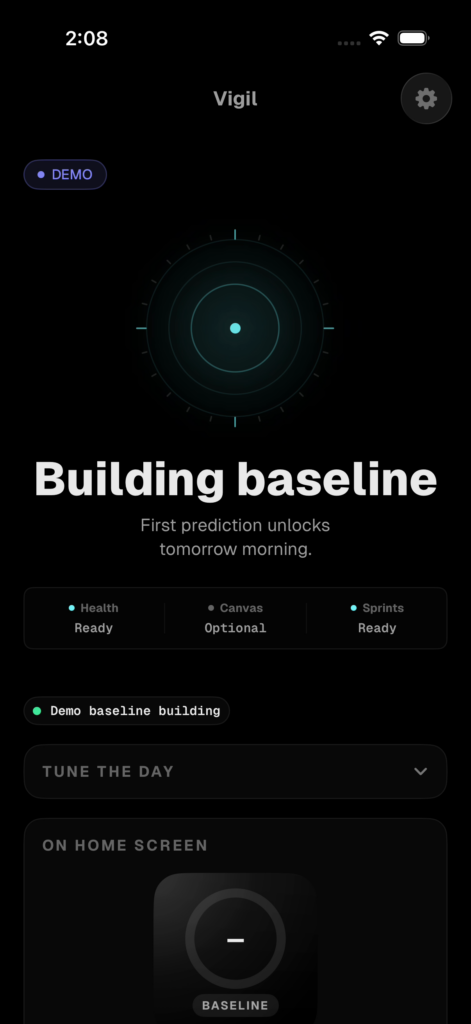
There’s an honesty problem hiding in here. For a brand-new user, there’s no baseline yet. I could have faked a confident score from population averages and hoped they didn’t notice. Instead, when there are fewer than three days of data, the dashboard shows a “building baseline” calibration state and says so out loud: the first real prediction unlocks tomorrow morning. An honest first week beats a fake-confident one.
The intervention policy
Predicting risk is the easy half. Deciding whether to act on it is where trust is won or lost, so the decision runs through four gates, and the function that evaluates them is read-only. It never fires anything and never advances a counter. It just returns a decision. Side effects happen separately, which matters more than it sounds.
// Gate 1: quiet hours
if isQuietHours() { return DecisionResult(action: nil, reason: "Quiet hours active") }
// Gate 2: cooldown
if minutesSinceLast < Double(profile.interventionCooldownMinutes) { ... return nil }
// Gate 3: daily budget
if effectiveCount >= maxDaily { ... return nil }
// Gate 4: risk threshold
guard prediction.riskScore >= 60 else { return DecisionResult(action: nil, reason: "Below threshold") }
// Escalate to a Live Activity at >= 80
let type: InterventionType = prediction.riskScore >= 80 ? .both : .notification
Keeping evaluate() pure means the cooldown and daily-budget counters only advance after a notification actually goes out. A failed background run can’t quietly burn your daily budget, which was a real bug risk once the same logic started running in two different processes.
A gate I removed. Early on I had a fifth gate: a hard seven-day “learning phase” that blocked every intervention until a baseline existed. It seemed responsible. After an engineering review I deleted it, because it meant the app delivered zero value for the first week, which is exactly when a new user is deciding whether to trust it. The source still carries the marker // NOTE: Learning phase guard REMOVED per eng review. The calibration messaging does that job now without going silent for a week. I only caught it by walking a new user’s first week day by day and realizing days one through six would have handed them nothing.
The intervention moment
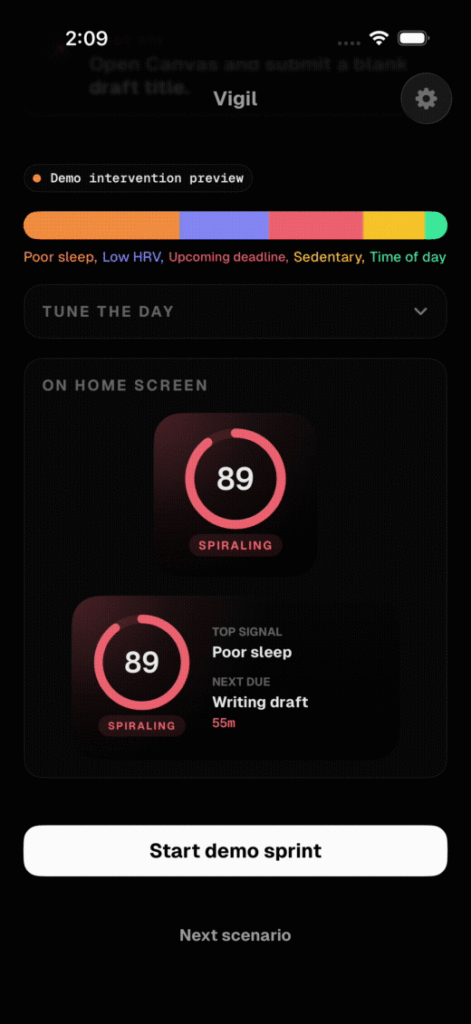
When risk crosses 60 and the gates allow it, you get a notification with three actions: Start Sprint, Snooze, Can’t do. At 80 and above you also get a Live Activity in the Dynamic Island. Here’s the actual flow, from the crash-risk dashboard into a live sprint.
The focus sprint and the wall-clock timer
A focus timer that drifts when you lock your phone is worthless, and most do, because they decrement a counter that pauses in the background. Vigil’s timer derives the remaining time from the actual clock instead, so locking the phone changes nothing. On resume it just recomputes.
private var elapsed: TimeInterval { now.timeIntervalSince(startDate) }
private var remaining: TimeInterval { max(0, Double(durationSeconds) - elapsed) }
If you keep working past the 15 minutes, the timer shows the overtime in the accent color rather than zeroing out and scolding you. Working past the sprint is a win for the product, so it’s acknowledged, not punished.
The Dynamic Island, the hard part
This was the most technically ambitious surface in the app, and the one that nearly broke me. The Complete and +5 buttons in the Dynamic Island are real App Intents, and App Intents run in the widget extension process, not the app. They can’t reach the app’s state directly. So the only correct way to make a button tap change what the app shows is to route everything through the shared SwiftData store that both processes can see.
@MainActor
func perform() async throws -> some IntentResult {
    let container = try SharedContainer.makeContainer()   // the SAME store the app uses
    let context = ModelContext(container)
    let descriptor = FetchDescriptor<Intervention>(predicate: #Predicate { $0.id == interventionId })
    guard let intervention = try context.fetch(descriptor).first else { ... }
    Self.applyCompletion(to: intervention, now: Date())
    try context.save()
    await endActiveSprintActivities()
    return .result()
}
Because the write happens in another process, the app reconciles it back into the live UI on scenePhase == .active and on a 2-second foreground poll, so a tap in the Dynamic Island shows up in the app within a couple of seconds. The +5 button has its own subtlety: it recomputes the new end time from the saved start time plus extensions, not from the timer’s current value, which kills a double-tap race where two quick taps could compound incorrectly. The user never sees any of this, which is exactly how I wanted it.
The AI first step
The one place I use a language model is generating the first step, because “open Google Docs and type the essay title” is far more startable than “work on your essay.” The prompt is sharp and ADHD-specific, and the whole call races an 8-second timeout so the sprint always starts, model or no model.
let systemPrompt = """
You are Vigil, a cognitive prosthetic for ADHD. The user's executive function is crashing right now.
Your job: give them the absolute smallest, most concrete first action they can take on this task.
Rules:
- ONE sentence. Maximum 15 words.
- Must be physically actionable in under 2 minutes
- Start with a verb
- Be specific: "Open Google Docs and type your name" not "Start working on it"
- No encouragement, no fluff, just the action
"""
static let fallbackStep = "Open the assignment and read the first paragraph."
The only thing ever sent to Gemini is the task title. No sleep, no HRV, no health data, ever. And the prediction itself never touches the model. Gemini writes a sentence. The rules engine makes every decision.
Background execution and the learning layer
Two more pieces make it real. A BGAppRefreshTask re-runs the entire pipeline headless roughly every 15 minutes, so Vigil can predict and intervene while the app is closed, which is the reason it doesn’t need you to open it. That loop is also where the control-systems framing stops being a metaphor: each cycle senses the user’s state, the policy actuates an intervention, the logged outcome becomes feedback for the next cycle, and the personal baseline is the setpoint the controller regulates against. It’s a closed feedback loop that happens to run on a phone instead of a motor. And an opt-in shadow log records every prediction and its outcome into a PII-free schema, building the dataset that a future model could train on. That’s the “log now, train later” foundation. The runtime stays rules-based and explainable today, and the data to do better accumulates quietly in the background.
Project Planning
I ran this project spec-first. Every major capability started as a written spec with acceptance criteria and an explicit “what’s built vs what’s intended” ledger, so I never lied to myself about scope. There are six dated specs in the repo plus the original build spec, and they predate the first commit. That habit came directly from my last big project, a from-scratch language model build, which taught me that if you don’t document a complex system as you go, you lose the thread.
The build itself ran in nine phases over about 6.5 weeks, with a pull-request-per-feature workflow that emerged by mid-May.
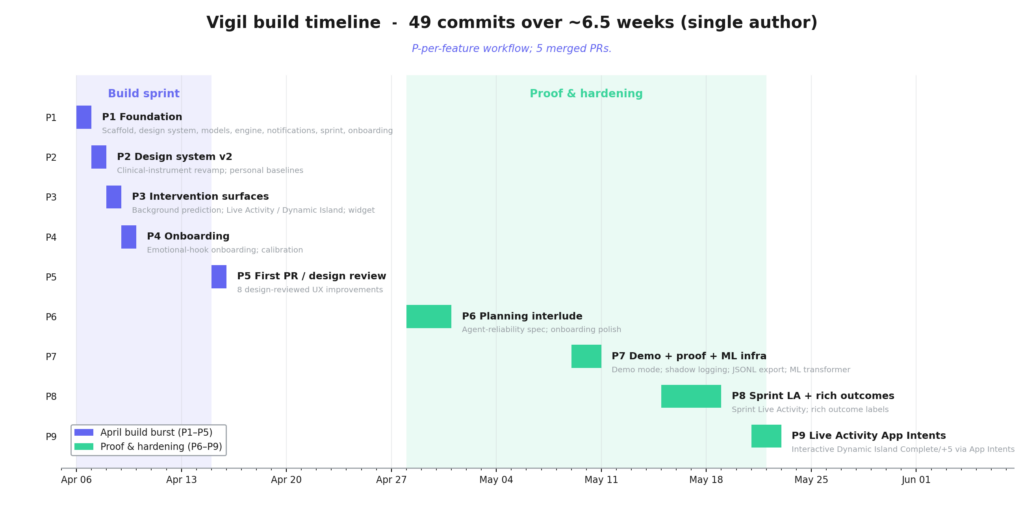
You can watch the project change character around mid-May. The early bars are all feature-building. The later ones are me proving the features actually work, which is a more grown-up way to spend two weeks than I usually manage. Somewhere in that planning interlude it stopped being “add more surface area” and turned into “make this trustworthy enough to hand to someone.”
How the design evolved: the pivot
The single most important design decision was throwing away a working app. LevelUp solved the obvious problem (students have assignments, give them better task breakdown) and it worked technically. But when I tested it on a genuinely bad executive-function day (two of them, about a week apart, and both times I just looked at the icon and didn’t tap it) the flaw was obvious. It still needed me to open it. That redefined the whole problem, from “students need a better task manager” to “students need help before they lose the ability to start.” Vigil came out of that redefinition, and it’s probably the strongest define-test-redefine story in the project. It only happened because I tested the assumption underneath the app instead of just testing the app.
Prototyping strategy
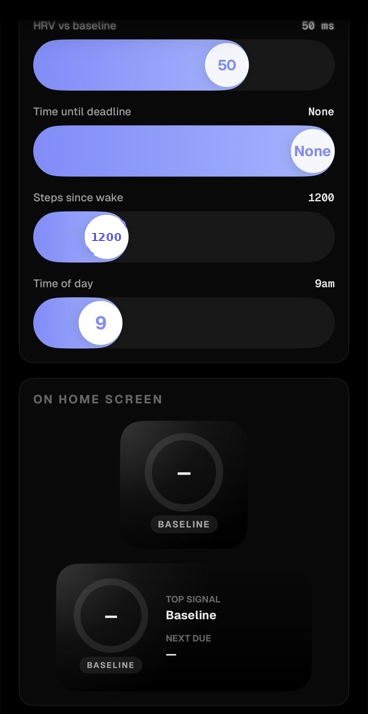
I used prototypes at four fidelities, on purpose. LevelUp was itself a full-scale prototype that taught me the problem was wrong. The wireframes in this report were the low-fidelity pass that locked down structure before I spent time on pixels. SwiftUI previews let me iterate single components in isolation. And the shipped app is the high-fidelity prototype with real platform integrations. There’s also a fifth one worth calling out: demo mode, which I rebuilt from a passive gallery of canned screens into an interactive “flight simulator” with live sliders, so I could drive the real prediction engine in front of someone and show the score move.
Feedback I got, and what I did with it
Three sources of feedback shaped the build. I tested LevelUp on myself, which drove the pivot. My sister tested Vigil and responded well to the concept and flow, which mattered because she came at it as a user, not the person who built it. And a friend gave me UI feedback, specifically that onboarding wasn’t clear enough. I used that to rework the first-run experience into the four-step flow with the emotional hook and the calibration interstitial. The design system itself went through two full rewrites, including one external code-review pass that I folded in for contrast and accessibility fixes.
Bill of Materials and Cost Analysis
Vigil is software, so the “materials” are frameworks, tools, and services. The striking thing is how little it costs to build, because almost everything is either an Apple framework or open source.
| Resource | Role | Cost |
|---|---|---|
| Swift 6, SwiftUI, SwiftData | Language, UI, persistence | Free (Apple) |
| HealthKit | Sleep, HRV, steps | Free (Apple) |
| ActivityKit, WidgetKit, App Intents | Live Activity, widget, interactive buttons | Free (Apple) |
| BGTaskScheduler, Keychain | Background runs, secret storage | Free (Apple) |
| Apple Developer Program | On-device testing, Live Activities | $99 / year |
Google Gemini API (gemini-2.5-flash) | First-step generation | Free tier covers dev volume, pay-as-you-go beyond it |
| Canvas LMS REST API | Deadline data | Free (school account) |
| XcodeGen | Project generation (build-time tool only) | Free, open source |
| Geist + Geist Mono | Typeface | Free, open source |
| PyTorch, scikit-learn | Offline ML workspace (not in the app) | Free, open source |
| iPhone + Mac | Dev and test hardware | Already owned |
| Total marginal cost | ~$99/year, plus negligible API usage |
The deliberate “zero third-party runtime dependencies” rule has a cost angle too: nothing in the shipping app can break because someone else’s package changed, and there’s no per-seat SDK fee waiting to appear if this ever scaled. The build splits into three targets on purpose, and that split is a real implementation choice rather than bookkeeping. The Dynamic Island buttons physically cannot run in the app’s process, so the shared SwiftData store is the joinery that holds the app and the widget extension together.
Testing and Validation
I tested Vigil on three levels, and they prove genuinely different things. This distinction turned out to be one of the more useful things I learned all project.
Engineering testing: does the code behave? 138 unit tests, written in Swift Testing, ~3,500 lines. The suite is strongest exactly where being wrong would hurt most. The prediction formulas are pinned with exact-value assertions (6 hours of sleep against a 7.5-hour baseline has to interpolate to ~42.86, and the weights have to sum to 1.0). The four intervention gates are each tested, including a test that proves evaluate() never writes to disk. And the machine-learning export has two property tests I care about more than any feature test: one proves no private text ever lands in the export, and one proves a label can never be set from data that came after the prediction (no look-ahead, no leakage). Those tests encode the product’s promises, not just its functions.
PredictionEngineTests        12 cases   exact formulas, defaults, weight sum
InterventionDeciderTests     11 cases   gates, cooldown, budget rollover, purity
V1FeatureJSONLExporterTests   9 cases   PII exclusion, no-look-ahead integrity
DemoModeTests                14 cases   seven-layer isolation, no real rows
AppStateLifecycleTests       26 cases   full predict -> intervene -> sprint -> outcome
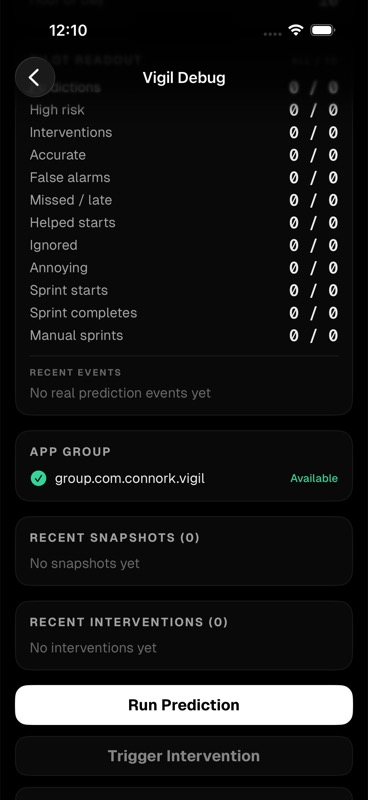
Real-device testing: does the platform behave? Some things can’t be proven in a simulator. On a real iPhone I verified HealthKit permissions and live values, Canvas sync, notifications, the widget, the Dynamic Island, and the wall-clock timer surviving a locked phone. The on-device debug console exists specifically so I could check the live score, the background-run status, and the raw signals on real hardware.
Product testing: was the idea right? This is the one that mattered. The decisive test wasn’t a green suite, it was using LevelUp on a bad day and watching it fail in the exact way it was meant to help. That’s what drove the pivot. Then my sister tested Vigil’s flow and responded well to it, and a friend’s onboarding feedback pushed me to rebuild the first run. The recurring theme across everyone I watched, including myself, was the same one the whole app is built on: the problem was never not knowing the task, it was not starting it. That’s exactly why the onboarding friction-profile step asks users to name their own stall signature (Starting, Time blindness, Task switching, Overwhelm) instead of picking from a generic list. The product also closes its own testing loop: after a sprint, it asks whether it actually helped, and that answer becomes a training label.
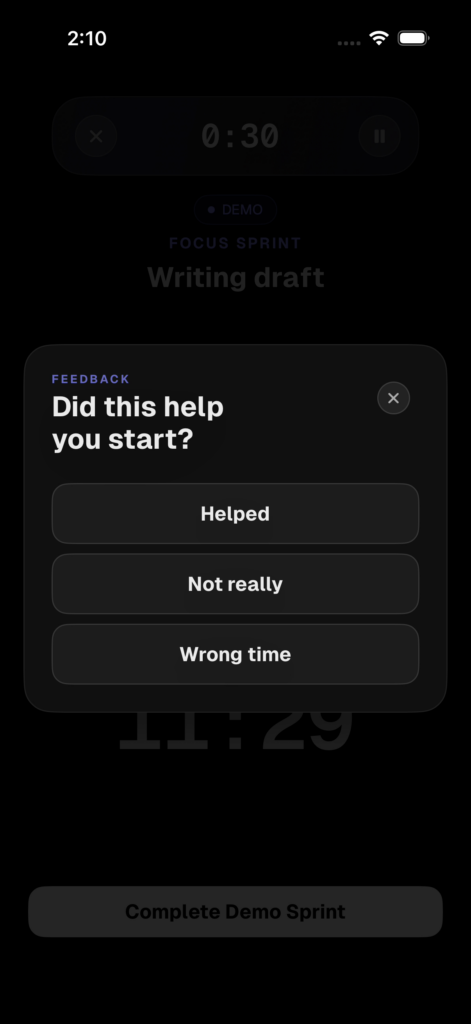
The honest limit here: this is early user testing, not a formal multi-user pilot. The app is instrumented for one (the pilot metrics in Figure 16 are real and wired), but I haven’t run a cohort yet. I’d rather say that plainly than dress up three testers as a study.
Offline evaluation: AutoResearch
There’s a fourth kind of testing I built that sits between the unit tests and the live product. It’s a pair of offline “AutoResearch” loops, kept deliberately separate from the app so they can run on a plain Linux box with no Xcode. One loop optimizes the Gemini first-step prompt by generating outputs for a set of locked task cases and scoring them on hard rules: one sentence, fifteen words or fewer, starts with a verb, actionable in under two minutes, names a concrete object. The other is a pure-Python, deterministic mirror of the prediction engine and the intervention policy, scored against twelve hand-built “day in the life” traces (a perfect morning, a low-sleep deadline crunch, a late-night quiet-hours case, and so on).
The second one is the interesting one, because it lets me put a number on the thing the whole product is supposed to do. Here are the shipped weights run against those twelve traces.
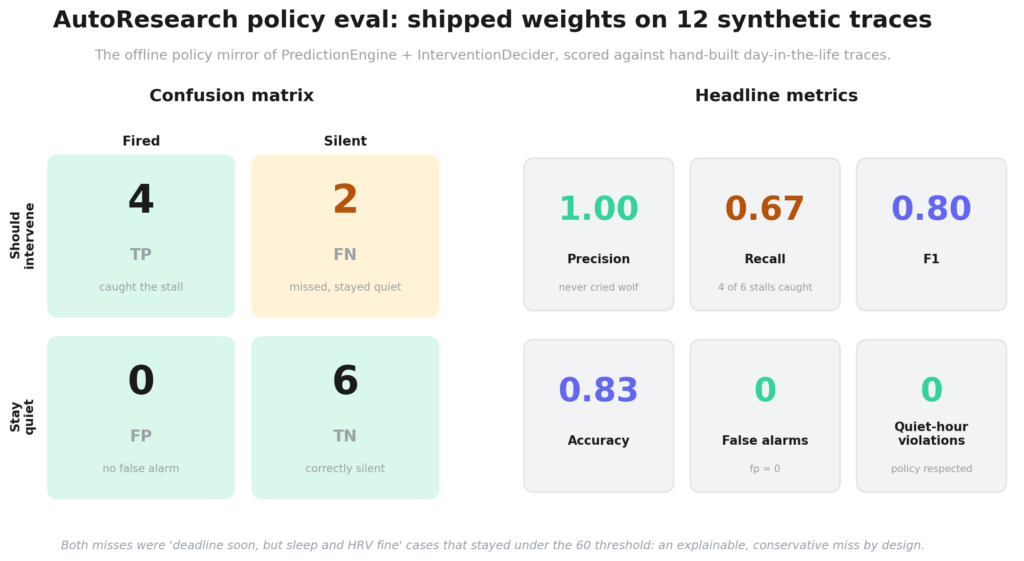
Precision is 1.00, and that’s the number I actually care about. It means zero false alarms across the set, and false alarms are the one thing most likely to get the app muted and then deleted. Recall is 0.667: it caught four of the six states that should have fired and missed two. Both misses were the same shape, a deadline coming up while sleep and HRV were fine, so the weighted score stayed under the 60 threshold. That’s the conservative tradeoff doing its job, and because the engine is interpretable I can read off exactly why each one stayed quiet instead of guessing.
The rule I set for these loops matters as much as the loops do: they never auto-edit Swift. A winning prompt or a better weight set gets ported back into PredictionEngine.swift and InterventionDecider.swift by hand, then validated on a Mac with Xcode before it can reach a real phone. I wanted a person in the way of every change that touches what a user actually sees.
Sustainability and Code of Ethics
Vigil handles ADHD, health, and academic data, which are about as sensitive as personal data gets, so ethics weren’t an add-on. They shaped the architecture.
The core decision is that the app is private by structure, not just by promise. All user data lives in a local SwiftData store on the device and is never uploaded. There are exactly two network destinations, both first-party to the user: their own Canvas server, and the Gemini endpoint that only ever receives a task title. Secrets like the Gemini key and Canvas token live in the Keychain, marked device-only so they never sync to iCloud, and they’re never logged. There’s no analytics, no crash reporting, no telemetry SDK, which means there’s simply nothing there to leak or sell.
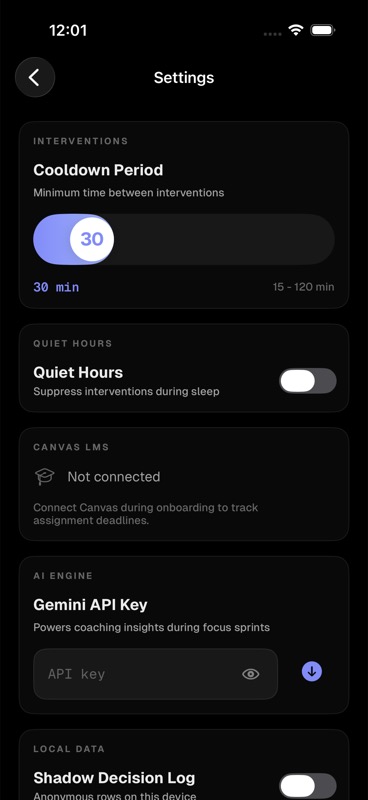
The shadow log that feeds future machine learning is opt-in and PII-free by construction. The schema explicitly excludes assignment names, notification text, raw HealthKit records, and device identifiers, and reduces identity to a random anonymous ID, with a test that fails if private text ever sneaks in. There’s an ethical argument hiding in the rules-vs-ML decision too: shipping an interpretable engine instead of a black box means the app can always explain why it interrupted you, which for a tool that pings people about their own mental state feels like the only defensible choice.
On sustainability, the honest framing is that this is a software project with no physical fabrication and almost no cloud footprint. Prediction runs on-device, data stays on-device, and the only outbound calls are tiny. There’s no server farm, no hardware to manufacture or dispose of, and the compute cost of a weighted sum running every 15 minutes is negligible.
Conclusions and Recommendations
DOES THE PROTOTYPE MEET THE DEFINITION STATEMENT? Mostly, yes. The definition was: detect the moment a student is about to lose the ability to start, and intervene proactively, in the moment, without making them open an app. Vigil does that. It reads live signals, predicts a personal risk score, and fires a notification or a Dynamic Island sprint with a concrete first step, driven by a background task so it works while the app is closed. The full loop runs end to end on a real device. What it doesn’t have yet is proof at scale, which is a different claim and I’m not going to pretend otherwise.
WHAT I’D IMPROVE, RANKED BY IMPACT. First, wire in live Screen Time and device-pickup data. The schema fields, baseline slots, and ML columns are already reserved for it, but the extension that fills them from real usage isn’t built, so behavioral drift is the one signal Vigil designs for but doesn’t yet read. Second, run an actual multi-user pilot using the metrics that are already wired. Third, and only after the data justifies it, graduate the offline transformer into shadow mode and let it influence decisions if and only if it provably beats the rules engine. The order matters: collect, prove, then promote. Never the other way around.
THE BIGGER LESSON. The thing I’ll take from this isn’t a feature. It’s that the hardest decisions were about restraint. Quiet hours, cooldowns, a daily budget, keeping the engine interpretable, deleting the learning-phase gate, refusing to let the model make decisions before it earned the right. A predictive system that interrupts people earns that right by being correct and by shutting up when it isn’t sure. I came in wanting to build something clever, and the cleverest thing in the finished app turned out to be the list of reasons it has for staying quiet. That’s not where I expected to land when I started deleting the planner.
How This Maps to the Course Outcomes
I’d rather be precise about this than claim every box equally. Vigil is a deep software and product-design project with adjacent control-systems evidence. It is not a physical robotics build, and saying so makes the genuinely strong criteria more believable.
| Outcome | Where the evidence is | Strength |
|---|---|---|
| Computational Thinking and Coding | Prediction engine, baseline, policy, App Intents, 138 tests (Figures 3 and 12, code above) | Direct, strong |
| Digital Design and Modeling | Wireframes, design evolution, logo and icon iteration, design system, UI (Figures 5–10) | Direct for 2D digital design |
| Creative Ideation and Innovation | The LevelUp-to-Vigil pivot and the rejected alternatives | Direct, strong |
| Iterative Testing and Refinement | Three-level testing plus an offline policy eval, the pivot, user feedback (Figures 16–18) | Direct, strong |
| Project Planning and Management | Spec-first method, nine phases, Gantt (Figure 14) | Direct, strong |
| Prototyping Strategies | Four prototype fidelities, demo flight-simulator (Figure 15) | Direct, strong |
| Ethical and Sustainable Design | Local-first, no telemetry, Keychain, opt-in PII-free logging (Figure 19) | Direct, strong |
| Interdisciplinary Integration | CS, iOS engineering, ADHD psychology, physiology, education data (Figure 3) | Direct, strong |
| User-Centered Research and Empathy | Problem rooted in lived need, friction profile, user tests | Direct, early-stage |
| Technical Communication | This report, the figures, the walkthrough recording | Direct, strong |
| Fabrication and Implementation | Software implementation across the iOS stack, BOM | Direct for software, adjacent for physical fabrication |
| Robotics Systems and Control | Sense-decide-act control loop, controller architecture (Figure 3) | Adjacent, framed honestly as a software control system |
References
Apple Inc. (2024). ActivityKit: Display live data with Live Activities. Apple Developer Documentation. https://developer.apple.com/documentation/activitykit
Apple Inc. (2024). App Intents. Apple Developer Documentation. https://developer.apple.com/documentation/appintents
Apple Inc. (2024). BackgroundTasks: BGAppRefreshTask. Apple Developer Documentation. https://developer.apple.com/documentation/backgroundtasks
Apple Inc. (2024). HealthKit. Apple Developer Documentation. https://developer.apple.com/documentation/healthkit
Apple Inc. (2024). SwiftData. Apple Developer Documentation. https://developer.apple.com/documentation/swiftdata
Barkley, R. A. (2012). Executive functions: What they are, how they work, and why they evolved. Guilford Press.
Forte, G., Favieri, F., & Casagrande, M. (2019). Heart rate variability and cognitive function: A systematic review. Frontiers in Neuroscience, 13, 710. https://doi.org/10.3389/fnins.2019.00710
Google. (2024). Gemini API documentation. Google AI for Developers. https://ai.google.dev/gemini-api/docs
Lim, J., & Dinges, D. F. (2010). A meta-analysis of the impact of short-term sleep deprivation on cognitive variables. Psychological Bulletin, 136(3), 375–389. https://doi.org/10.1037/a0018883
Nahum-Shani, I., Smith, S. N., Spring, B. J., Collins, L. M., Witkiewitz, K., Tewari, A., & Murphy, S. A. (2018). Just-in-time adaptive interventions (JITAIs) in mobile health: Key components and design principles for ongoing health behavior support. Annals of Behavioral Medicine, 52(6), 446–462. https://doi.org/10.1007/s12160-016-9830-8
Ra, C. K., Cho, J., Stone, M. D., De La Cerda, J., Goldenson, N. I., Moroney, E., Tung, I., Lee, S. S., & Leventhal, A. M. (2018). Association of digital media use with subsequent symptoms of attention-deficit/hyperactivity disorder among adolescents. JAMA, 320(3), 255–263. https://doi.org/10.1001/jama.2018.8931
Thayer, J. F., Hansen, A. L., Saus-Rose, E., & Johnsen, B. H. (2009). Heart rate variability, prefrontal neural function, and cognitive performance: The neurovisceral integration perspective on self-regulation, adaptation, and health. Annals of Behavioral Medicine, 37(2), 141–153. https://doi.org/10.1007/s12160-009-9101-z
Thorell, L. B. (2007). Do delay aversion and executive function deficits make distinct contributions to the functional impact of ADHD symptoms? A study of early academic skill deficits. Journal of Child Psychology and Psychiatry, 48(11), 1061–1070. https://doi.org/10.1111/j.1469-7610.2007.01777.x
AI Usage
I’ll be straight about how I used AI, the same way I have on past projects. I used it as a build and review partner, not a ghostwriter for the product. It helped me scaffold boilerplate, talk through architecture decisions (the cross-process Dynamic Island problem especially), and run code-review passes on contrast and accessibility that I then folded in by hand. The first-step generation inside the app uses Google’s Gemini, which is a documented product feature, not a writing shortcut, and the only data it ever sees is a task title. Every architectural decision, the rules-over-ML call, the removed gate, the pivot, was mine. The specs, the tests, and the design decisions in this report are my own work, and I can proudly walk through any line of the codebase.
A worked example, because it shows the power and the limits at once. The rich outcome labels work from the May hardening push is the clearest case of how I actually use an agentic coding tool (Claude Code) on this project. I started by asking it to deep-dive the whole repo and figure out what it would take to move Vigil from a demo to a real pilot, and I had it fan out four sub-agents at once, each auditing a different slice: the iOS code, the spec-versus-reality gaps, the ML workspace, and the demo-to-production blockers. Then I ran the same question through a second, independent pass and made the two analyses argue with each other.
That second opinion earned its place. It caught two bugs I would have shipped. The first was a side-effect leak: demo mode muted notifications in the foreground, but the background task could still wake up and fire a real notification on real signals, because the demo flag only lived in memory on the foreground app. The second one actually mattered. The machine-learning exporter was labeling a “crash” using the rules engine’s own future risk score as the ground truth. Train a model on that and you teach it to imitate the rules engine instead of predicting a real stall, which would have quietly gutted the whole “log now, train later” reason the shadow log exists. I had not spotted it, and the test suite was passing the entire time.
From there I had it write the spec, split the work into three stacked pull requests, and run a separate agent on each in parallel. They did not go cleanly. Two agents wrote the same helper file with different function signatures and collided. The UI agent shipped methods that looked like they saved the user’s answer but threw it away on the very next line (literally _ = label), and it was at least honest enough to write tests asserting the no-op, which is how the discard surfaced. I wrote corrective prompts, read every diff, and merged the stack myself.
The last bug is the one that stuck with me. After 92 passing tests, I ran the app by hand on a simulator, and the dismiss button on the outcome card worked fine until I relaunched, and then the card came back, because the dismissal was only held in memory. Nothing in the suite caught it. The green checkmark told me the feature was done and it was wrong. A bug-fix agent added a persisted field, failing test first, and that shipped as its own small PR.
So I created real leverage: exploring four corners of the codebase at once, getting a second read that caught a correctness bug, and parallelising the grind across pull requests. But every agent made mistakes, and the only reason the feature is correct is that I reviewed each change, and the real bugs showed up in manual testing rather than in a passing suite. For a tool whose entire pitch is being trustworthy, trusting the checkmark would have shipped three silent data bugs straight into it.
Appendices
Final project code. The full source lives in the project repository (110 Swift files across the app, widget, and test targets, plus the offline ML workspace). The files that carry the core logic, if you want to read the real thing rather than the excerpts above:
Vigil/Engine/PredictionEngine.swift, the weighted-sum risk engine.Vigil/Engine/BaselineCalculator.swift, the 7-day personal baseline.Vigil/Engine/InterventionDecider.swift, the four-gate, read-only policy (and the removed-gate marker).Vigil/Intervention/VigilSprintIntents.swift, the cross-process Dynamic Island App Intents.Vigil/Services/AIFirstStep.swift+GeminiService.swift, first-step generation with a timeout fallback.Vigil/Export/V1FeatureJSONLExporter.swift, the PII-free, no-look-ahead ML export.VigilTest/, the 138-case suite, including the privacy and no-leakage property tests.
Organizational plan evidence. See the nine-phase Gantt chart in Figure 14, backed by 49 commits, five merged pull requests, and the dated spec corpus in the repo’s docs/specs/ folder.
Project at a glance. 110 Swift files. ~13,900 lines of production code plus ~3,500 lines of tests. 3 native targets, 8 SwiftData models, 138 tests. 5 weighted prediction signals, 4 cognitive states, 4 intervention gates. 2 network endpoints, 0 third-party runtime dependencies. 49 commits over ~6.5 weeks.

Leave a Reply