1: As the project was announced, it actually made me quite struggle since I have nearly zero experience in Python so I have to go through how python code was made and the fundamentals.
I started with thinking of doing something sports related like a bouncing ball code. However, It came out that the background and the ball image is hard to be crafted together. From this, I got inspired to make a number guessing game.
____________________________________________
This is my Code for the project
____________________________________________
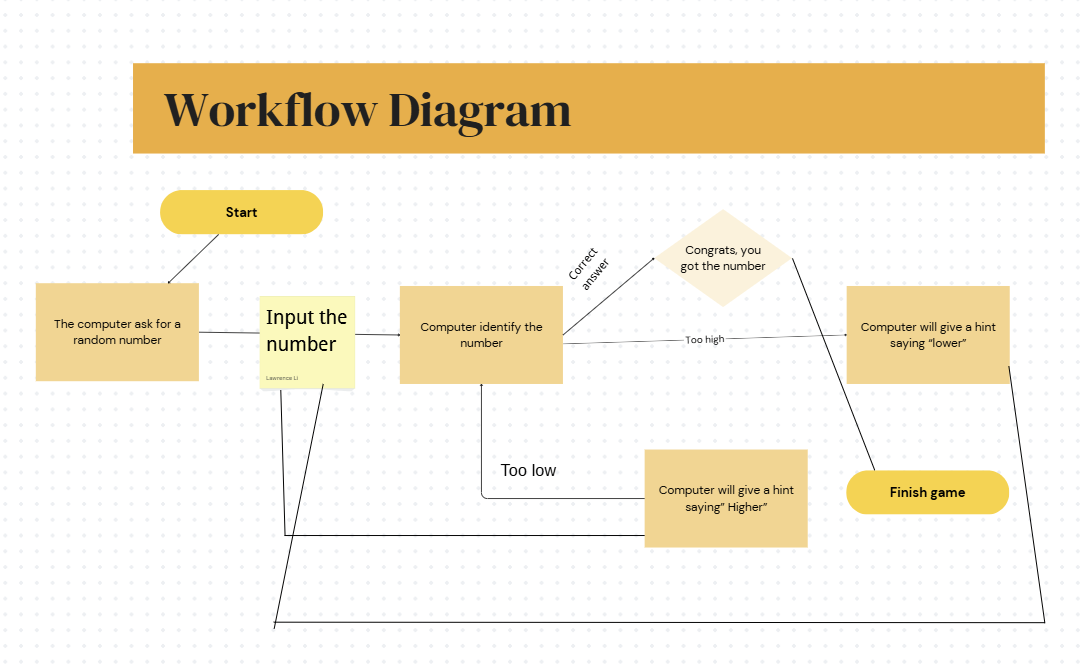
This is the flow chart of the process
____________________________________________
These are the definitions of what each code does
1:
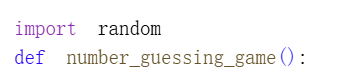
This sentence is mainly telling the system that we are about to code a thing that requires random generates and define this number_guessing_game
2:

This sentence means we are letting the system randomly pick a number to start the game and greet the user
3:

These are basically the greeting sentences, and sets the attempts count
4:
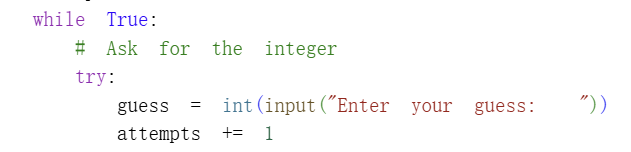
These code are basically setting up the place for user to type in their guesses for the game and as they typed an answer, it will count as an attempt
5:

These codes are basically giving out hints when the user’s guess is lower or higher than the actual number
6:

These are the codes that calculates the attempts and show the user that they got the correct answer
7:
This is basically the part of how the system should do if the player input a non-number thing
Function Definition


These are the parts pf Function, creating a reusable code that includes the whole game in it
Commentation
In this project I do beleive that my code is fairly clear even though it is only a simple number guessing game , this project actually helps me learn the basics of coding like the variables, definition statements and how to make the system show words. Moreover, it is also significant as a prerequisite for future projects that will be involving coding part in it
____________________________________________

Leave a Reply